Billing And Storage
AI Cloud usage is tied to tenant, project, runtime, and storage context. Use this page before launching long-running work, when a launch is blocked by spend or quota, or when storage ownership needs to be clear before a user or app team takes over a project.
What You Can Do
| Goal | Product path | Done when |
|---|---|---|
| Check spend | Account > Billing | balance, usage, budget posture, and active hourly burn are understandable |
| Prepare storage | Storage | the required bucket or storage resource is visible in the right project |
| Share or grant access | Storage or Access, depending on tenant policy | the user or service account can see only the storage it needs |
| Attach storage to work | Compute or Apps launch flow | the runtime launch references the expected storage input or mount intent |
| Recover from a block | Billing, Storage, or Support | the owner, next action, and evidence packet are clear |
First Checks
Before doing any billing or storage action, confirm the top bar shows the expected tenant and project. Project context controls usage attribution, quota, storage visibility, grants, and cleanup ownership.
Billing Concepts
| Concept | Meaning |
|---|---|
| Balance | Available funds or credits for usage. |
| Hourly burn | Estimated cost of currently running work. |
| Accrued usage | Usage accumulated by a runtime or project. |
| Quota | Product or project limit for capacity or resources. |
| Entitlement | Policy that allows or restricts a class of usage. |
Before Long-Running Work
Check:
- selected project;
- runtime family and SKU;
- expected duration;
- hourly burn;
- balance or entitlement;
- quota headroom;
- storage requirements.
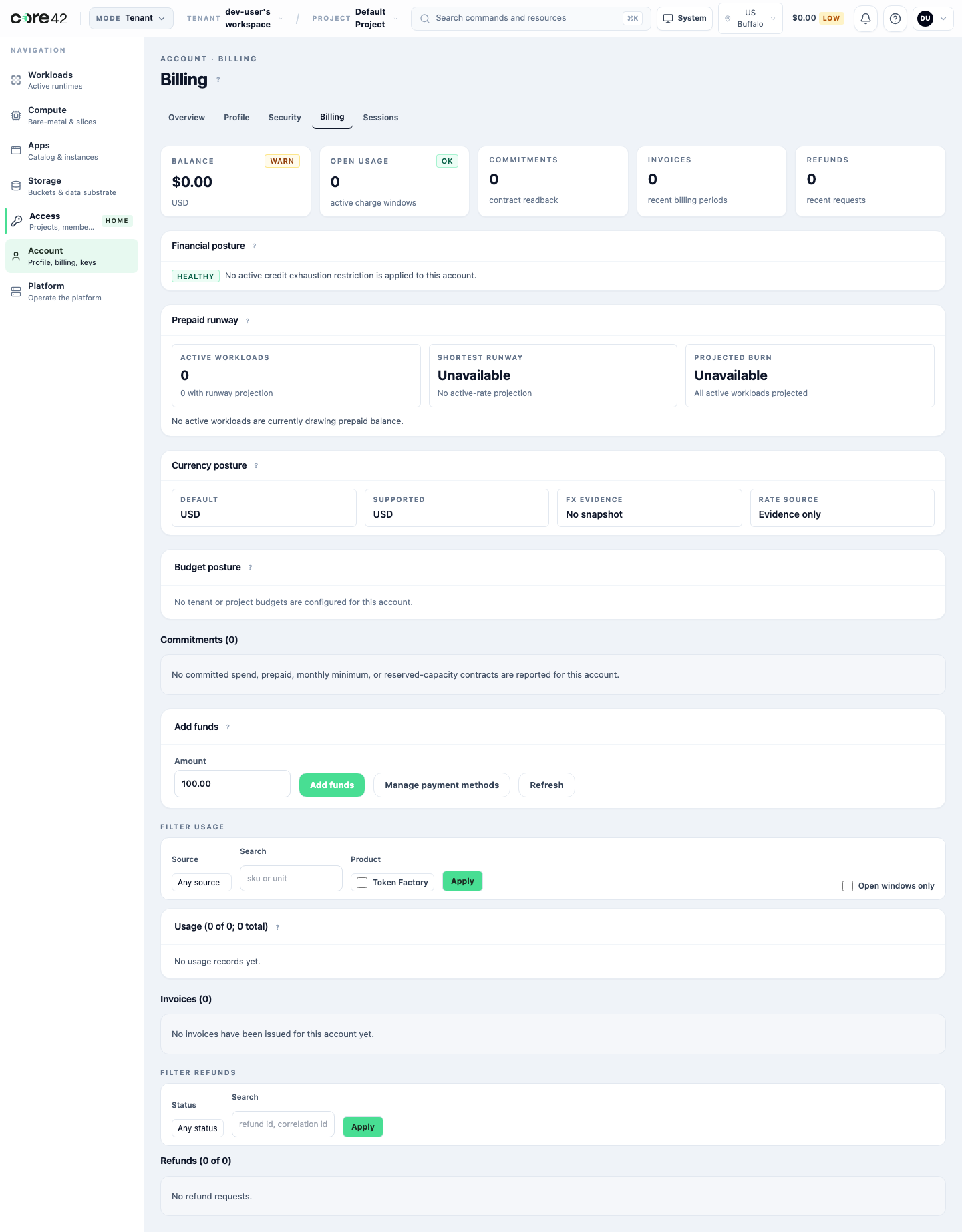
User Billing Workflow
- Open Account > Billing.
- Confirm the balance, currency, usage rows, and any budget or commitment posture.
- Check whether the intended project has enough quota or entitlement for the runtime family.
- If the balance is low or restricted, stop before launching and contact the billing owner or tenant admin.
- After releasing a runtime, return to billing and confirm the active hourly burn no longer includes that runtime.
Do not capture provider-private payment session IDs, raw ledger internals, tokens, or internal diagnostic URLs in screenshots. If support needs payment evidence, capture the product-visible status, correlation ID, amount, currency, tenant, project, and timestamp.
Payment And Provider Boundary
Some environments have payment provider integration enabled. Some internal or disposable environments use seeded credit or operator-managed balance instead.
| State | What the user should do | Evidence to keep |
|---|---|---|
| Payment handoff available | start the checkout or credit flow from the product action | product status before handoff, amount, currency, and return status |
| Payment returned successfully | confirm balance or credit changed in AI Cloud | product-visible receipt or balance change without raw provider IDs |
| Payment provider unavailable | do not retry blindly; contact tenant admin or support | visible unavailable state, correlation ID, tenant, project, amount |
| Billing restricted | do not launch more work until resolved | balance/quota state, blocked action, correlation ID |
| Low balance | reduce runtime duration, release stale work, or add credit | active burn and cleanup owner |
Payment screenshots in user guides should show AI Cloud states, not provider control panels or raw payment processor identifiers.
Tenant Admin Review
Tenant admins should review:
- active runtimes;
- stale workloads;
- quota pressure;
- balance and burn;
- service accounts that can launch work;
- project ownership and cost attribution.
Tenant admins should also review department or billing-group mapping when it is enabled. If that field is hidden in the current product view, record the expected attribution in the handoff packet and treat a missing mapping as a tenant setup gap.
Storage
Storage should be attached only when the workload needs it. Confirm the bucket or storage resource belongs to the correct project and that the user or service account has the needed permission.
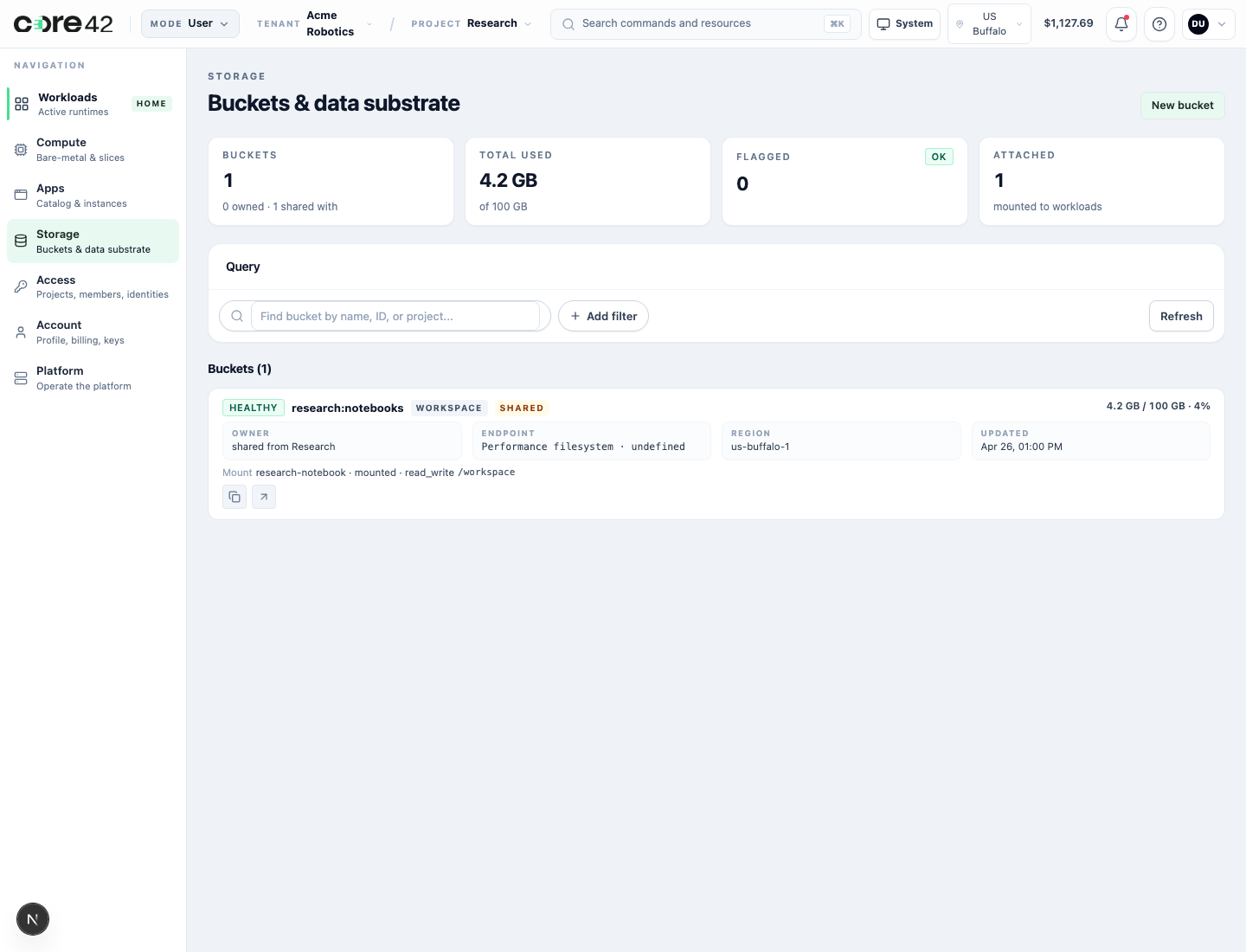
Common storage checks:
- project ownership;
- quota;
- access grant;
- data locality or region;
- cleanup owner;
- retention expectation.
Storage Lifecycle
| Step | User or admin action | Expected result |
|---|---|---|
| Create or confirm bucket | Open Storage and create or select a project bucket. | bucket name, project, region, quota, and owner are visible |
| Review detail | Open the bucket detail view. | lifecycle, grants, attached workloads, and event or evidence pivots are understandable |
| Grant access | Add the user or service account that needs the data. | grant is scoped to the project, principal, and intended permission |
| Attach to runtime | Select the bucket or mount during Compute or Apps launch. | launch summary shows storage input or mount intent before submit |
| Use and monitor | Work from the active runtime or app route. | storage remains visible to the expected principal only |
| Clean up | Release runtime and apply retention policy. | attached workload is gone or released; retained data has an owner |
If a grant or bucket action is denied, capture the product-visible error, correlation ID, bucket name or ID, tenant, project, requested permission, and timestamp. Do not paste raw bucket policies or provider credentials into support tickets.
Attach Storage To Compute Or Apps
Storage attachment should be visible before launch, not discovered after the runtime is active.
Check:
- the selected project owns or can access the bucket;
- the selected user or service account has the required permission;
- the app/runtime family supports the storage input;
- mount path or object-storage endpoint is clear to the user;
- storage quota and region are compatible with the runtime.
If the launch form does not expose a storage input for a data-heavy workflow, record that as a product gap for the app/runtime family instead of relying on an operator to mount data manually.
Quota, Permission, And Recovery States
| Blocked state | Likely owner | Recovery path |
|---|---|---|
| Insufficient balance | user, billing owner, or tenant admin | release unused work, add credit, or request billing approval |
| Project quota exhausted | tenant admin or platform support | release capacity, lower SKU, or request quota change |
| Storage quota exceeded | tenant admin or storage owner | delete unused data, increase quota, or choose another bucket |
| Storage permission denied | bucket owner or tenant admin | grant the least permission needed to the user or service account |
| Payment provider unavailable | billing owner or platform support | capture correlation ID and use operator-managed balance only if approved |
| Attach-to-runtime missing | app owner or platform support | document the missing runtime input and choose another supported path |
When a block is intentional, keep it in troubleshooting documentation. Do not use red or yellow blocked-state screenshots as normal happy-path user guide images.
Cost Control Habits
- Release unused runtimes promptly.
- Prefer smaller profiles for tests.
- Use project-specific service accounts for automation.
- Review stale notebooks, endpoints, and schedulers.
- Keep storage ownership and retention clear before handoff.
Handoff Checklist
Before giving a project to a user or app team, verify:
- billing balance or entitlement can support the walkthrough;
- low-balance and restricted states are understood;
- payment provider behavior is either tested or explicitly unavailable in the environment;
- at least one storage bucket or workspace storage path is ready if the guide uses data;
- grant/share behavior has been tested for a user and a service account when automation is part of the workflow;
- launch flow can reference the storage input or the missing input is tracked;
- quota and permission-denied recovery states have an owner and support packet.
Evidence Packet For Support
Tenant:
Project:
User or service account:
Billing or storage resource:
Action attempted:
Visible balance/quota/permission state:
Correlation ID:
Timestamp and timezone:
Expected result:
Actual result:
Cleanup owner:
Never include bearer tokens, cookies, private keys, service-account secrets, payment processor IDs that are not exposed by AI Cloud, raw storage policies, or provider console screenshots.